

Appearance
The Sheet
The Sheet puts every post of a post type into one grid: its own fields, its taxonomies, and every VX field, each as the right kind of cell. It is the screen for the work the post editor is bad at — fixing forty prices, filling in a column that was added late, checking which listings are missing a photo.
Turn it on: VX Modules → Modules → Sheet. A Sheet item appears in the submenu.
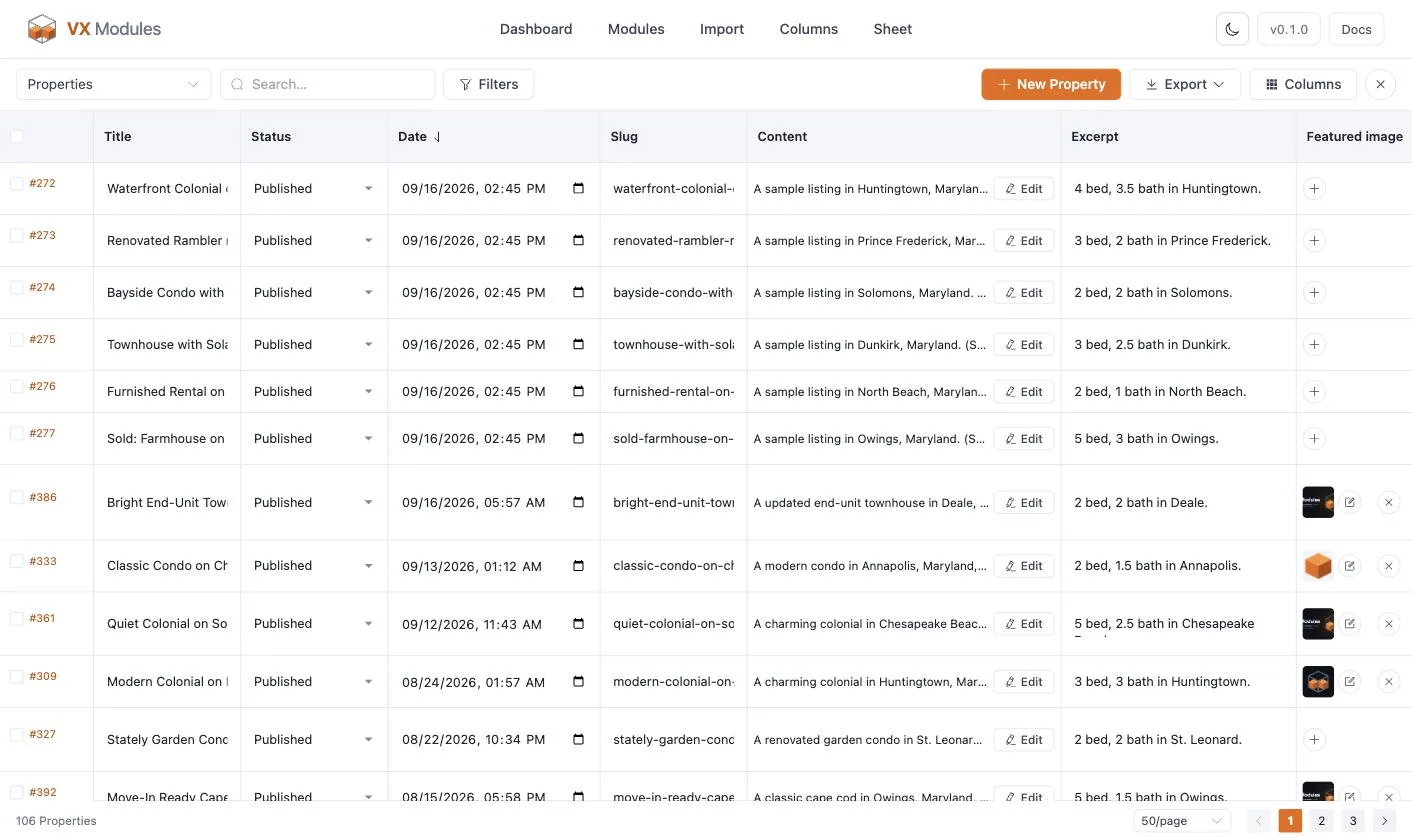
The grid
Pick a post type from the dropdown at the top left and the grid fills in.
Every cell is typed. A text field is an input, a choice field is a dropdown, a switch is a switch, a date field is a date picker, an image opens the media library, and relation and term fields are search boxes that look up what you type.
Cells save on their own. Type, click away, and the row saves — you never hit a save button. The row shows its state while it works and turns red with the message if VX refuses the value.
Every write goes through VX
The Sheet does not write meta directly. Values go through VX's runtime, so field types are coerced properly, VX's own required flags apply, and your validation rules are enforced. A change that would break a rule is refused with the reason, in the cell.
Getting to the right rows
| Control | What it does |
|---|---|
| Search | Free text across the post type |
| Filters | Status, author, any taxonomy, and any choice or switch field |
| Column headings | Click to sort; click again to reverse |
| Columns | A checklist of which columns to show. Title cannot be hidden |
| Paging | 25, 50, 100, or 200 rows a page |
| Full screen | Drops the admin chrome so the grid gets the whole window |
Hidden columns, filters, sorting, and page size are the view — and the Export → Everything in this view option exports exactly what the view is showing.
Adding and duplicating
- New <post type> adds a draft row at the top, ready to type into.
- Select one row and Duplicate makes up to 50 copies as drafts, with its fields, terms, and content.
Bulk edit a column
Select rows, then Bulk edit and choose a column. The dialog previews the change on every selected row before anything is written — you see what each post is now and what it would become. It is the same bulk editor the posts list uses; the full list of operations is in Admin columns and bulk edit.
Long content
Rich text, content, and other fields that need room are not edited in a cell. Clicking one opens the post's own editor in a frame with the admin chrome hidden; saving there tells the Sheet, and the row refreshes. You stay where you were in the grid.
Exporting
The Export menu offers two CSVs:
| Choice | What you get |
|---|---|
| Everything in this view | Every row the current filters, search, and sort produce — with the columns currently shown |
| Selected rows only | Just the rows you ticked |
Groups export as one column per sub-field (address__street), which is the same shape WP All Import reads back — so a CSV exported here maps itself on the way in.
Permissions
The Sheet requires manage_options, and each row still respects WordPress's own capabilities: you cannot create a post type you cannot create, and you cannot edit a post you cannot edit.