

Appearance
Messaging
Members talking to each other, and to the people behind a listing. Threads, groups, files, read receipts, and a chat dock in the corner that follows them around the site.
Turn it on: VX Modules → Modules → Messaging. A Messaging item appears in the submenu, and the module builds its own tables the moment you switch it on.
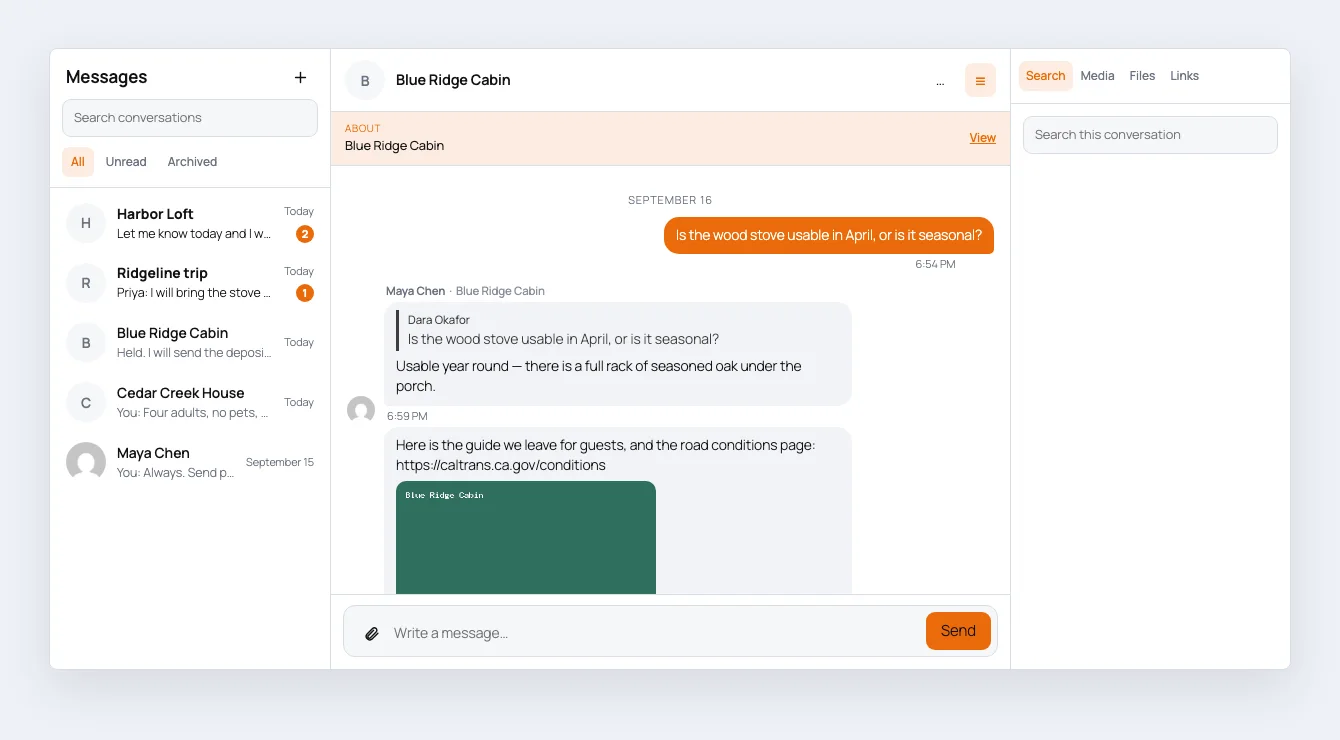
Switching it on also creates a Messages page holding the VX Messages block, so a link has somewhere to land before you have built anything. Delete that page if you would rather build your own — it is not recreated.
What a conversation is
A conversation is between people, and it may be about something.
- Member to member. Two people, no subject.
- About a listing. The same two people, with a post attached. The listing's owner and a buyer can hold separate conversations about separate listings without them running together.
- A group. More than two people, with a name.
The listing is a subject, not a speaker. A post never sends anything; the person who owns it does, and their name is on the message with the listing's name beside it.
The same thread, read two ways
A conversation about a listing is titled for whoever is looking at it:
| Who is looking | What the row says |
|---|---|
| The person who inquired | Blue Ridge Cabin — the listing, because that is what they were thinking about |
| The person who owns it | Dara Okafor, with Blue Ridge Cabin as a chip underneath |
One row, two readings, and neither party has to learn the other's model.
Starting a conversation is a link
There is no "message this person" widget to place, because a link works in every builder you already use.
| Link | What it opens |
|---|---|
/messages/?about=17 | The author of post 17, about that post |
/messages/?to=42 | Person 42, with no subject |
/messages/ | The inbox |
Put that on any button, in any builder. Build the URL with a dynamic tag so it points at whoever is on the page — see Messaging dynamic tags.
If the viewer cannot message that person — they are signed out, they are blocked, the person is themselves — the tag returns nothing, so hide the button with a visibility rule rather than showing one that refuses.
Placing the messenger
Four ways, all the same messenger:
| Where | What to use |
|---|---|
| Block editor | The VX Messages block |
| Elementor | The VX Messages widget |
| Bricks | The VX Messages element |
| Anywhere | [vxm_messages] |
All three builders show a real messenger while you are editing, built from sample data, so you can style against something that looks like the thing.
Each carries the full set of style controls — see Styling the messenger.
Inside a conversation
Replies. Reply to a particular message and the original is quoted above yours. Click the quote to jump to it, however far back it is.
Files. Photos show in the conversation, everything else downloads. Attachments are kept out of the Media Library, stored under a random name, and served only to people in that conversation — a guessed URL gets a 404, and so does a signed-out request.
Mentions. Type @ and the start of someone's name. @Ana finds Ana Krul without typing the rest; @Ana Krul works too. Only people actually in the conversation match, so a mention cannot be used to find out who is on the site.
Read receipts. Whether the sender is told their message has been read. It is worked out by comparing how far each person has read, so it stays right when somebody reads on their phone and then on a laptop.
Online status. A dot beside anybody active in the last minute.
The side panel. Search inside this conversation, or list its photos, files and links. On a group it also lists who is in it.
The chat dock
A messenger in the corner of every page, the way a social network does it. Members carry their conversations with them instead of going back to the inbox.
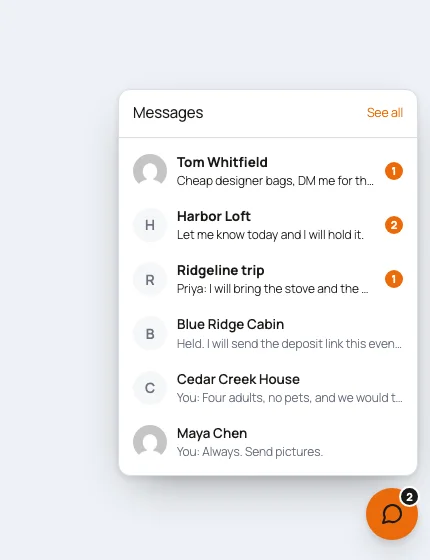
It remembers which conversations were open as the member moves around the site, and it is deliberately absent from the Messages page itself, where it would be the same thing twice.
Turn it off under Messaging → In the conversation → Chat dock.
New messages arrive on their own
The messenger checks for new messages about once a second, using a small endpoint that does not load WordPress at all — it compares a file's timestamp and answers in about five milliseconds. On a host where that cannot run, it falls back to the REST API every ten seconds, and the Health panel on the Messaging screen tells you which one is live.
Nothing you have to configure either way.
What to read next
| Page | What is on it |
|---|---|
| Settings | Every setting, and the Health panel |
| Dynamic tags | @inbox, message_url, response figures, the unread badge |
| Styling | The style controls in all three builders |
| Moderation | Reports, blocking, removing a message, exporting a conversation |