

Appearance
The admin screens
Everything VX Modules adds to wp-admin lives under one VX Modules menu. It is a single-page app on hash routes, so each submenu item opens the same page at a different address (admin.php?page=vx-modules#/forms). Every screen requires manage_options.
Which items are in the submenu depends on which modules are on.
| Screen | Always there | Needs |
|---|---|---|
| Dashboard | Yes | — |
| Modules | Yes | — |
| Import | Yes | — |
| Columns | No | Columns module |
| Sheet | No | Sheet module |
| Forms | No | Forms module |
| Entries | No | Forms module |
| MCP | No | VX's MCP surface available |
| Settings | Yes | — |
Dashboard
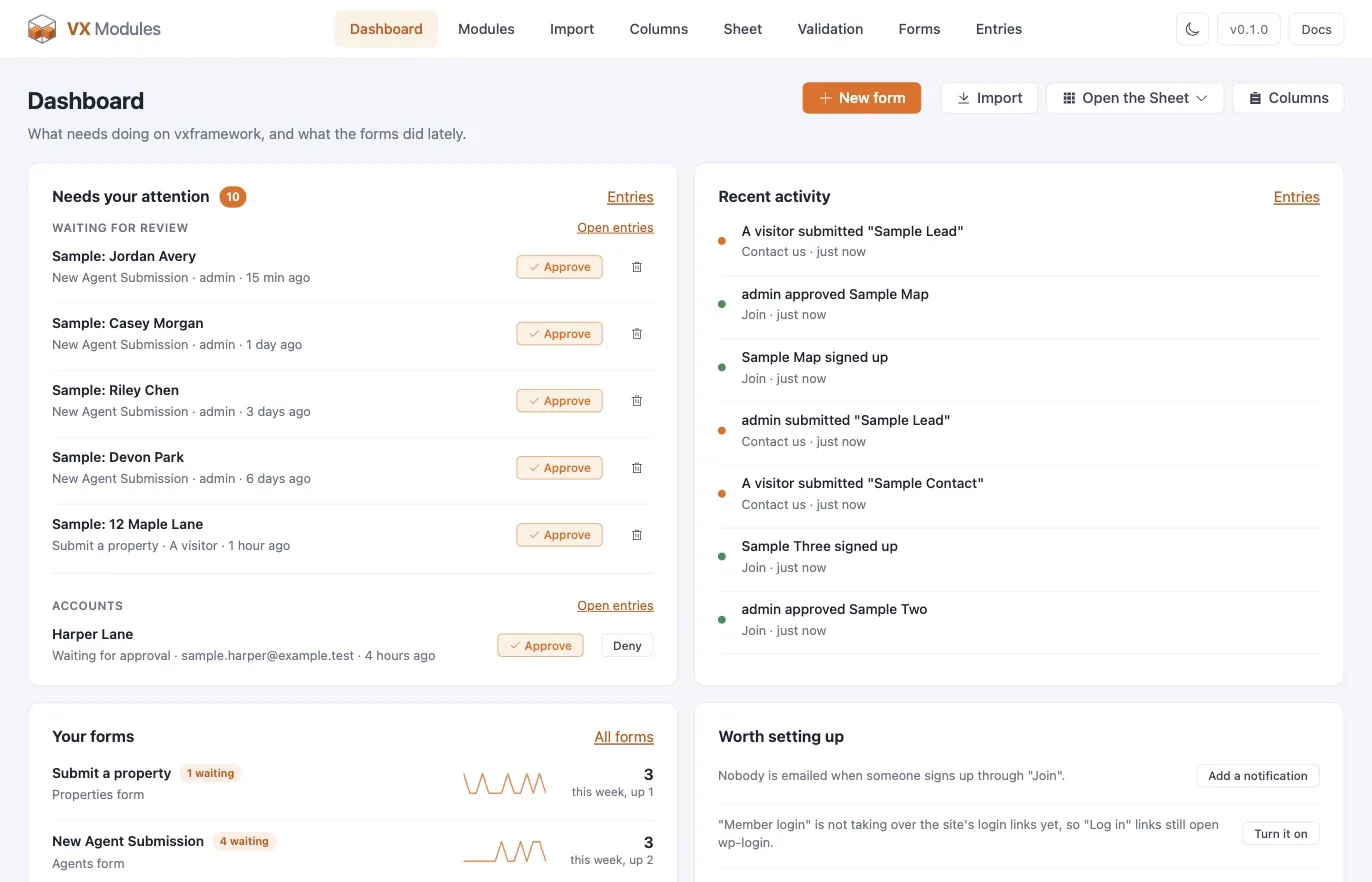
The Dashboard is about forms, so it fills in once the Forms module is on. Four cards:
- Needs your attention — posts waiting for review and accounts waiting for approval, each with the buttons to decide it without leaving the page.
- Recent activity — what came in lately, newest first.
- Your forms — every form with this week's count against last week's, so a form that has gone quiet is obvious.
- Worth setting up — nudges for things a site usually wants and has not done yet.
Posts written by anything that does not go through a form — an AI agent, an import, a REST client — are checked against your validation rules after the fact and listed here when they break one.
Modules
The switchboard. Every module with its description, its requirement if it has one, and a switch. Turning one on or off takes effect immediately; a module that is off is never booted.
Import
Moving an existing site's custom fields into VX. One tab each for ACF, Meta Box, and Pods, plus a WP All Import tab. See Importing.
Columns
The column set of a post type's list screen — its own columns and its VX fields together. Only listed while the Columns module is on. See Admin columns and bulk edit.
Sheet
The full-screen grid. Only listed while the Sheet module is on. See The Sheet.
Forms
The form list and the form builder. Only listed while the Forms module is on. See Forms.
Entries
Everything that came in through a form — posts created, standalone submissions, accounts registered, product options bought. Only listed while the Forms module is on. See Entries.
MCP
A report, not a control panel. VX Framework serves the MCP endpoint and decides how much of the site to expose; this screen lists the abilities VX Modules contributes, says whether they are currently reaching the endpoint, and links to VX's own AI settings screen. It changes nothing itself. See MCP and abilities.
Settings
Two sections, and one of them only appears when a store module is on.
| Section | What's in it |
|---|---|
| FluentCart / WooCommerce | Whether a product's VX fields show on the store's own product template, the heading above them, which fieldsets to show, where they go, and whether blank fields show. See VX fields on product pages. |
| Bot protection | The site's Cloudflare Turnstile keys, its look and size, and a button to adopt keys another plugin already has. Set once here; each form has its own switch. See Settings reference. |
WP-CLI
bash
wp vxm modules list
wp vxm modules enable <key>
wp vxm modules disable <key>

wp vxm import acf              # show the mapping, change nothing
wp vxm import acf --apply      # create the VX fieldsets, inactive
wp vxm import acf --run        # convert stored values, batched and resumable
wp vxm import acf --run --dry-run
wp vxm import acf --switch     # activate VX, deactivate the source's groups
wp vxm import acf --cleanup    # delete the source's leftover rows
acf can be swapped for metabox or pods.