

Appearance
Messaging settings
VX Modules → Messaging. The module works without touching any of this; every default is one a site can live with.
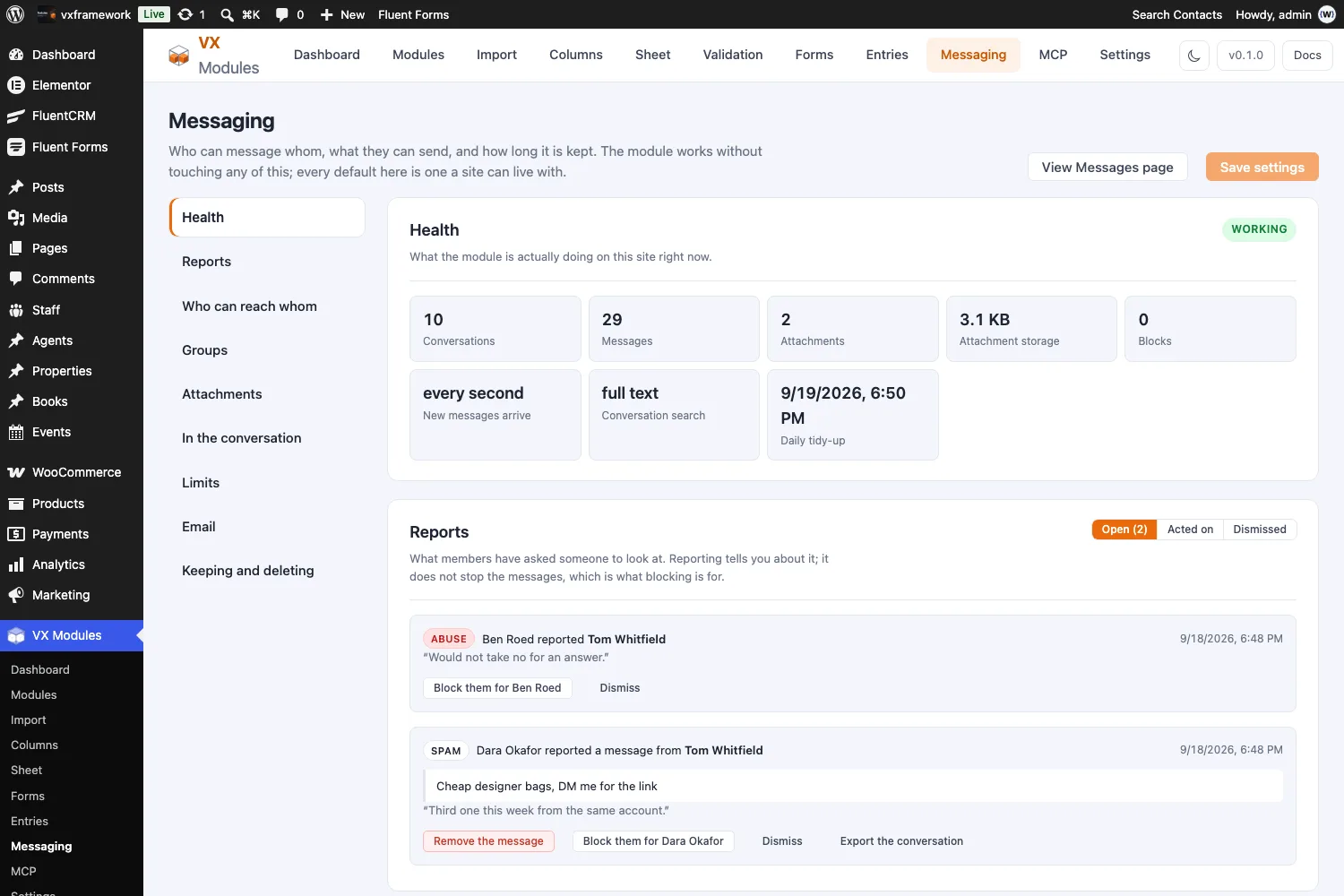
Health
The screen opens here, because the first question about a module like this is whether it is actually working.
| What it tells you | Why it matters |
|---|---|
| Working / Needs a look | Tables present, a Messages page exists, the fast poll is running |
| Conversations, messages, attachments | What is on the site |
| Attachment storage | What the files are taking up |
| New messages arrive | every second, or every 10s if the host refused the fast endpoint |
| Conversation search | full text if the database supports it, basic otherwise |
| Daily tidy-up | When the clean-up job next runs |
Three things raise a warning:
- The tables are missing. Turn the module off and on again to build them.
- There is no Messages page. Links like
/messages/?to=12have nowhere to land. - Running on the slower poll. The host would not run the standalone endpoint, so messages arrive every ten seconds instead of every second. Everything works; it is less immediate.
Who can reach whom
The two settings most worth getting right. Both are cautious by default.
Starting a conversation
| Setting | What it means |
|---|---|
| From a listing or profile only (default) | There is no searchable list of members. Conversations start from a listing or a profile. |
| Anyone can search for anyone | Any member can find any other by name. |
| Only these roles can be searched for | Pick the roles. Anyone else can still be messaged from their listing. |
The default is closed on purpose. A marketplace where buyers should only reach vendors through a listing does not want its buyers findable, and that is the more common shape — so opening the directory is a decision you make, not one you have to discover and undo.
What a conversation can be about
Which post types can be a conversation's subject. Empty means member to member only — no listing is ever attached. Set it to your listing post type to get the two-sided titling described in Messaging.
Members can hide a conversation
Hiding clears it from their own list and leaves the other person's untouched.
Groups
| Setting | What it does |
|---|---|
| Allow groups | Off leaves every conversation between two people |
| Who can add people | The owner and admins, or any member of the group |
| Most people in one group | Between 2 and 200 |
| Mentions | Whether typing @ and a name notifies that person |
Attachments
Files members send each other. They are kept out of the Media Library and served only to people in the conversation, under a random name.
| Setting | Notes |
|---|---|
| Allow attachments | Off removes the paperclip |
| File types | Extensions without the dot. Anything not listed is refused |
| Largest file | In megabytes |
| Files per message | Between 1 and 20 |
The size field reads PHP's own limit and says what it is. If you set 10 MB on a server that stops at 2, the field says so — a setting that lies is worse than a low one.
In the conversation
| Setting | What it does |
|---|---|
| Read receipts | Whether the sender is told their message has been read |
| Online status | A dot beside anybody active in the last minute |
| Response figures | How quickly and how often somebody answers, available as dynamic tags |
| Chat dock | The messenger in the corner of every page |
Limits
Two separate brakes, because they stop different things.
| Setting | What it stops |
|---|---|
| Messages allowed … every … minutes | A runaway client, or a flood in one conversation. Default 30 every 5 minutes |
| New conversations an hour | Spam. An account that opens forty threads in an hour is not talking to anyone. Default 10 |
Zero means no limit on either.
Email
Email about unread messages sends for a message somebody has not read while they were away, and quiet hours hold anything waiting until the morning.
Not built yet
These settings are on the screen and nothing sends anything yet. They are listed here so the screen is documented honestly; email notification is on the roadmap.
Keeping and deleting
Both of these throw things away, and both are off unless you turn them on.
Delete messages older than
Days. Zero keeps everything, which is the default — a marketplace usually wants the record of what was agreed.
Set a number and a daily job deletes messages and their files past that age, a batch at a time, along with any conversation it empties. There is no undo.
Delete everything if the plugin is uninstalled
Off, so uninstalling to troubleshoot — or to move the plugin to another install — does not lose anybody's messages. With it on, deleting VX Modules drops every conversation, participant and attachment on the site.
The daily tidy-up
Runs once a day whether or not you set a retention period, and clears three things nothing else would:
- Files picked in a composer that was then abandoned. A file is uploaded the moment somebody chooses it, before the message exists — that is what lets the composer show a thumbnail — so an abandoned composer leaves one behind.
- Rows left pointing at a message that is gone.
- Anything past the retention period, if you set one.
Every pass takes a bounded batch, so a site with a large backlog drains over days rather than meeting a timeout halfway through.