

Appearance
Paying with Points
Members can settle a one-off Voxel order from their points balance instead of paying money. Memberships and paid listing plans are not supported — see One-off orders only. Off by default; switch it on under Settings and set the rate.
How it looks to a member
The toggle appears inside Voxel's own Cart Summary, directly above the checkout button:
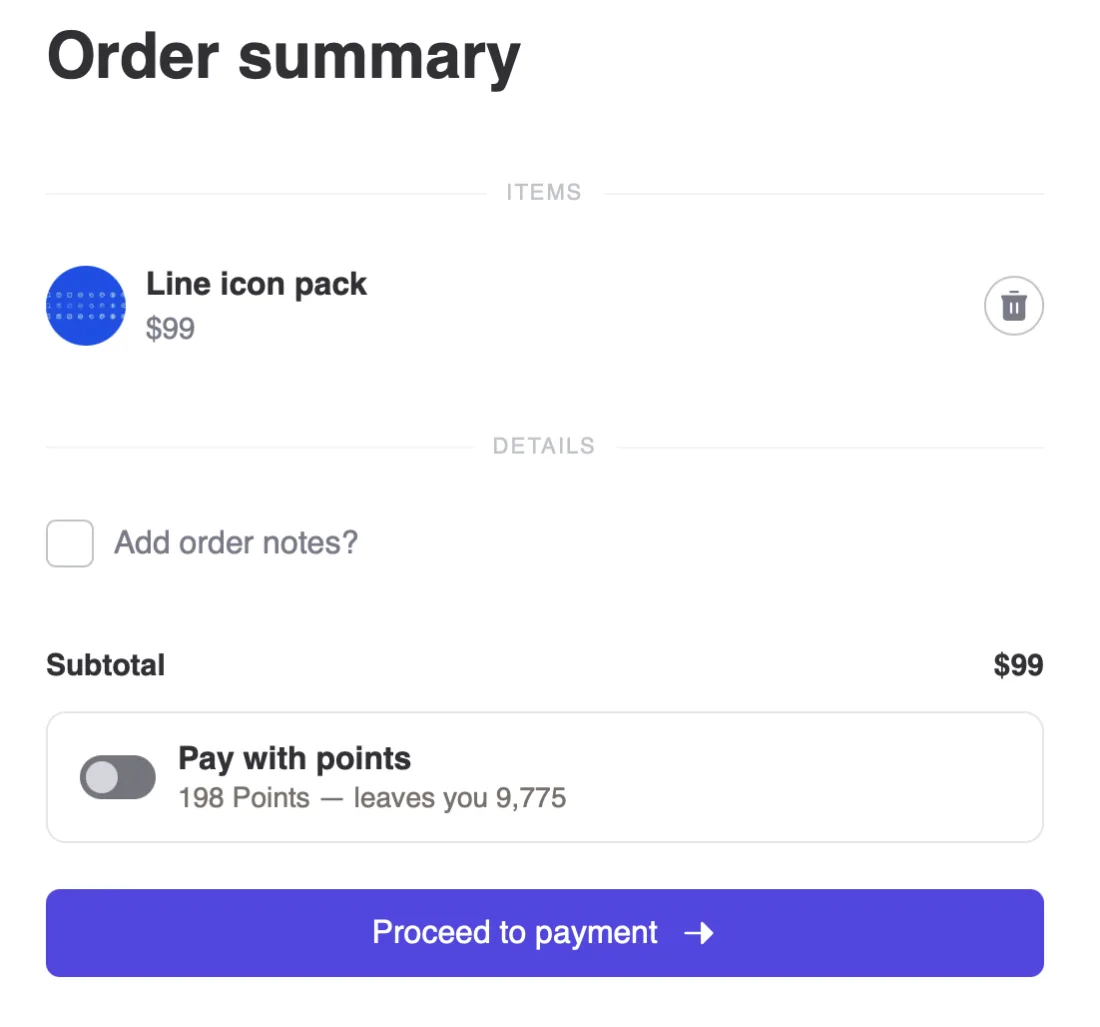
Switch it on and the checkout button changes with it — Proceed to payment becomes Pay with 198 Points, so the control a member presses says what pressing it will do.
The quote follows the cart. Change a quantity and both the toggle and the button re-price immediately — nothing is frozen at page load.
Nothing is placed and nothing is configured: the toggle appears on any Cart Summary once the feature is on and the member is signed in.
Already using the Pay with Points widget?
The separate Pay with Points widget still exists, for a checkout page that is not the cart. If you put one on your cart page as well, remove it — otherwise the page shows two switches for one setting.
Styling it
Voxel's Cart Summary gains a Pay with points (VXP) section on Elementor's Style tab: padding, radius, background, border and hover border, label and quote colour and typography, the colour used when the member cannot afford it, and the switch's track, knob and width.
The rate
One setting: points per unit of currency. At 2, the $99 cart above costs 198 points. Costs always round up, so a cart is never settled for fewer points than it is worth.
The rate in force is stamped on each order when it is paid. Changing the rate later does not rewrite history — an old order still reports the rate it was actually charged at.
All or nothing
Points cover the whole order or the toggle is not offered. There is no partial payment, and no "points plus card".
This is a deliberate limit rather than an oversight. Voxel exposes no filter anywhere in its cart or order pipeline for changing a price, a discount or a total. Taking money off an order would mean rebuilding Voxel's checkout in parallel and owning that copy forever, through every theme release. Choosing the payment method is a seam Voxel does support, and it is the same one Voxel's own Stripe, PayPal and Paddle modules use.
A member who cannot cover the cart sees how many more points they need, and the toggle stays disabled.
One-off orders only
Points settle one-off purchases. Memberships and paid listing plans are not supported, and the toggle does not appear for them.
Nothing in Voxel renews an order without a payment processor, so a plan bought outright with points would lapse, silently, at the end of the first period. An earlier build worked around that by having points buy trial days instead — the card is still collected, charged nothing now, and billed normally once the points-funded stretch ends. That has been withdrawn, for two reasons:
- Members could not reach it. Voxel sends a membership purchase straight from the pricing plans widget to the processor (
voxel/paid_memberships/skip_cart_summary, defaulttrue). There is no cart page in that flow, so the toggle — which lives in the Cart Summary — never appeared. - Where it did appear, it misdescribed itself. On a single-item checkout page the button read "Pay with 198 Points", while what actually happened was that the member bought a stretch of days and still had to hand Stripe a card. The wording promised the opposite of the behaviour.
Funding a plan with points is worth doing properly — offered from the widget where plans are actually chosen, worded as what it is. Until then it is better absent than half-present.
What the member sees afterwards
The order records the sale in currency, because that is what was bought. The points that settled it appear alongside, on both the member's order page and the admin orders screen:
▸ Paid with 198 Points
     Points used     198 Points
     Order total     $99
     Rate            2 Points per $1
The count sits in the heading so it reads without expanding anything.
Refunds
Points leave the balance the moment the order is placed — unlike a card payment, which simply is not captured. So an order that ends up declined by the vendor or cancelled by the customer returns the points automatically, and the order page says so.
The order cannot then be charged again: the ledger's dedup key is deliberately not released, because the order is finished.
Safeguards
- The balance is re-checked at the moment of payment, not just when the toggle was offered. A balance that moved in between cannot overdraw.
- The charge carries the order id, and the ledger's unique index refuses a second charge for the same order — a double-submitted checkout cannot double-charge.
- The checkout button is held while the toggle is talking to the server, so a fast click cannot check out before the choice has been recorded.
- If the cart grows past what the balance covers after the toggle was set, the button reverts to Proceed to payment rather than promising a payment checkout would refuse.
- A vendor who approves orders by hand still gets to approve this one.
If the toggle does not appear
- Paying with points is off, or the rate is
0(Settings). - The visitor is not signed in — the toggle never renders for guests.
- The cart is empty, or its subtotal is zero.
- The balance will not cover the cart and stay above the minimum balance.
- The widget on the page is not Voxel's Cart Summary.
- The cart holds a subscription — a membership or a listing plan. Those are not supported, so the toggle is not offered for them.
Limits worth knowing before you switch it on
- One-off orders only. Memberships and paid listing plans cannot be paid for with points.
- One rate for the whole site. No per-product or per-role rates yet.
- No partial payment (see above).
- Guest checkout cannot pay with points — a balance belongs to an account.